Google is rolling out new dairy-free and gluten-free dietary options for food menu items on eligible Google Business Profiles (GBP). Restaurants can now share these menu details with customers who look for suitable food choices on Google Search and Maps.
The feature may not yet be ready for all restaurants. Restaurant owners should open their menu editor. Check whether the dairy‑free and gluten‑free options appear.
For restaurants, this change is very useful. Customers often search for places that meet their needs before deciding where to eat.
How This Update Helps Restaurants Reach Target Customers
When a person searches for a restaurant, they may want more than a nearby location. Many people search for gluten‑free meals, dairy‑free dishes, or a restaurant that clearly explains its menu options.
By adding dairy‑free and gluten‑free details to food menu items, restaurants can give customers more information before they visit.
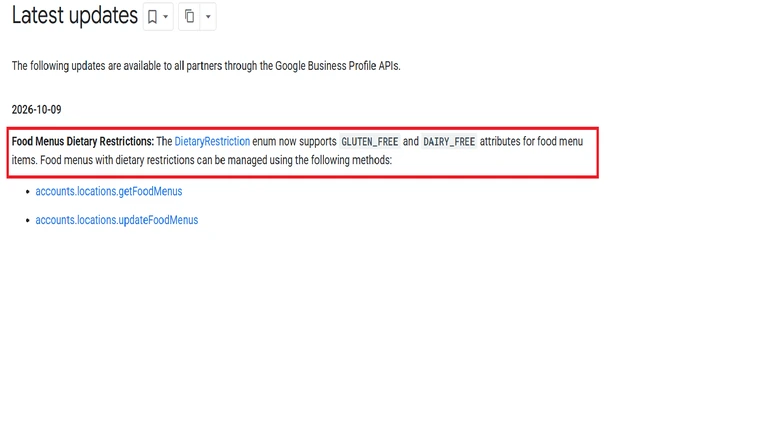
For example, a person searching for gluten‑free food nearby may prefer a restaurant that clearly lists dishes to one that offers little menu information. Accurate menu details help consumers understand what a restaurant has to offer and if it meets their needs.
How This Can Support Local SEO for Restaurants
Improve menu relevance – I think creating a GBP for restaurants is a start. Optimizing dairy‑free and gluten‑free information helps restaurants give details about their food. This can help Google understand the menu better.
Connect with customers with food preferences – Dairy- and gluten-free restaurants can let people looking for local food know about their offerings.
Facilitate customer choices – Menu details, prices, descriptions, and pictures of the food can help customers know what to expect before they come or order food items.
Build a Google Business Profile – Keeping menu information correct and current helps to create a Google Business Profile for customers. Along with menu information, updated business hours, and genuine customer reviews, Google Business Profile services can help restaurants maintain visibility and provide useful information to nearby diners.
What Restaurants Should Do
Restaurant owners should review their Google Business Profile. Check whether their location supports food menus. They can then ensure that eligible menu items have names, descriptions, prices, photos, and dairy‑free and gluten‑free information.
It is important to mark a dish as dairy‑free or gluten‑free only when the claims are accurate. Restaurants should also consider ingredient information and cross‑contamination risks when communicating suitability.
How to Check and Add Dairy-Free and Gluten-Free Options
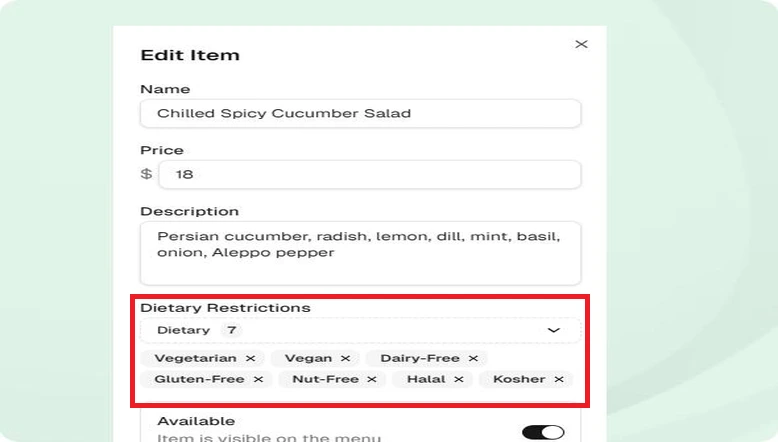
- Open your restaurant’s Google Business Profile.
- Select Edit Menu.
- Choose the menu item you want to update.
- Check the dietary options and select Dairy‑free or Gluten‑free where applicable.
- Save your changes. Check the published menu to make sure the information is accurate.
Final Thoughts
Google’s Dairy-Free and Gluten-Free Menu update gives restaurants another way to explain their menu to the audience. By keeping dairy‑free and gluten‑free information and making food choices easier to understand, restaurants can improve the customer experience and support local SEO efforts.
Google may take 24 to 48 hours to display menu changes on Search and Maps. Restaurant owners should check their profiles after saving updates. The biggest plus is better menu information for diners. Businesses looking for better local visibility should combine menu information with business information such as updated opening hours, quality food photos, and real customer reviews.
Need help with your restaurant’s Google Business Profile & local SEO? Contact GBP SEO team for assistance.