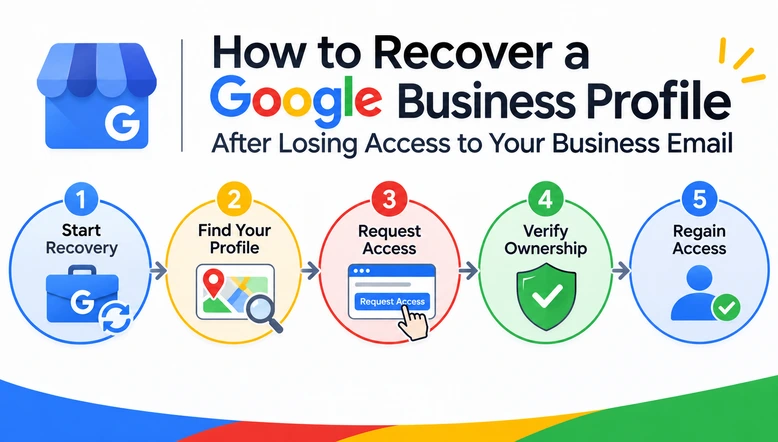
How to Recover a Google Business Profile After Losing Access to Your Business Email

How to Recover a Google Business Profile After Losing Access to Your Business Email

Imagine running a business for several years. Customers find you through Google Search and Google Maps. They call your business, check your opening hours, and read your reviews before they come to visit.

One day you go to update your business hours. You cannot sign in to the Google account that is linked to your business profile.

Maybe the employee who set up the profile left your company. The email account was deleted. You forgot the password. Your business switched to a new email system. No matter the reason, you suddenly realise you can no longer manage a part of your online presence.

This situation can be stressful. Especially when your business profile is still visible to customers. You cannot make any changes to it.
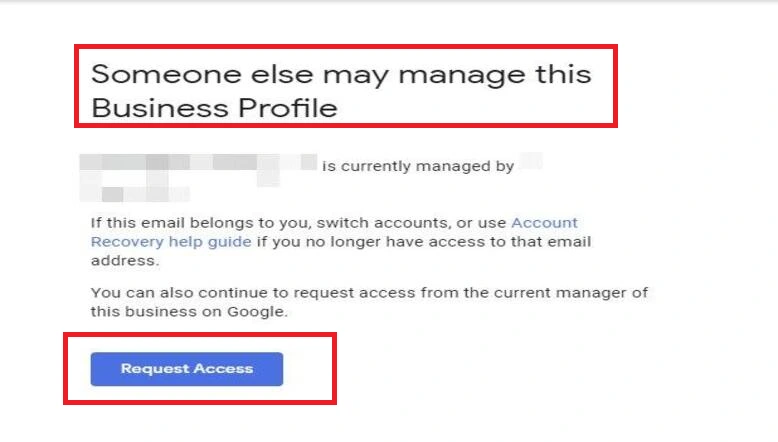
Someone manage Google business profile

The good news is that losing access to your business email does not mean you lose your Google Business Profile forever. Depending on the situation, you may be able to Reclaim Google Business Profile.

Let’s look at how to handle this without making things more complicated.

First, Understand What Actually Happened

Before you start trying to recover your business profile, pause and figure out what really happened.

Not all access issues are the same. The solution depends on the root cause.

For example, imagine a restaurant owner. His marketing assistant created the restaurant’s Google Business Profile using a company email address. A year later, the assistant leaves. The email account is turned off. The owner still sees the restaurant on Google Maps. He cannot sign in to manage it.

In this case, the problem is not the business profile. It is the Google Account used to manage it.

There are three situations to think about:

  • You cannot access your original Google account. You remember the email address. You forgot the password or can’t sign in.
  • Someone else manages your business profile. A former employee, owner, or marketing agency still controls it.
  • You do not know which email is connected to your profile. The person who created it is. No one knows the login details.

1. Request Ownership of Your Existing Google Business Profile

What if you cannot reach the person who created the profile? They no longer work with your business?

Google allows you to request ownership of a business profile that someone else is managing.

Follow these steps:

  1. Sign in using the Google Account that you want to use for the business.
  2. Enter your business name and address.
  3. Select the Business Profile from the list.
  4. If Google says someone else may manage the profile, choose Request Access.
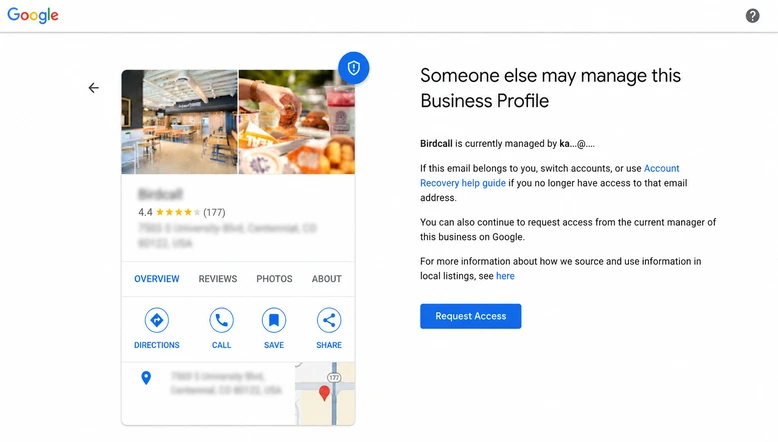
Google Business Profile Access Request

5. Fill out the form with your business details and the level of access you need.

6. Submit the request.
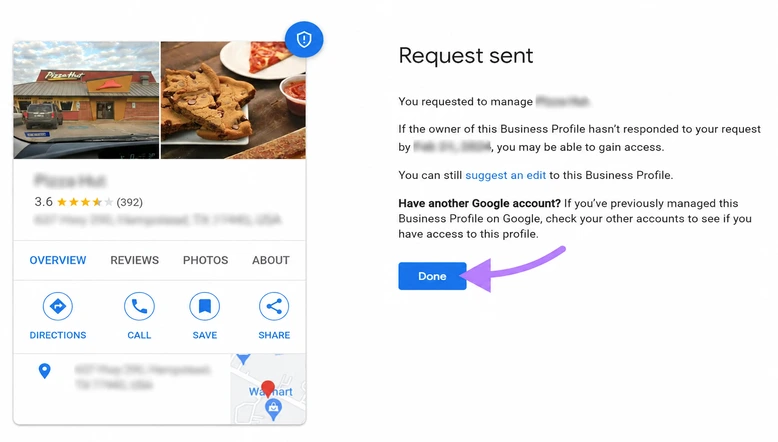
Google Business Request Sent Option

Google will send an email to the current profile owner. According to Google’s guidelines, the owner has three days to respond.

If the request is approved, you will receive an email confirming that you can manage the profile. If the request is denied, Google may let you appeal.

If there is no response after three days, you might be able to claim the profile yourself. Google does not guarantee this option will always work.

2. What If You Cannot Identify the Current Owner?

This is where it gets harder. You see your business on Google Maps. You have no idea who is managing it. The email shown may be partially hidden, so you cannot tell who the owner is.

In this case, do not rush to create a business profile. Instead, use Google’s support process to explain the issue.

Choose the option about business profile access or ownership. Explain that you are the business owner but cannot access the original email. Get ready to provide your business information and finish any verification that Google asks for.

In some cases, Google might ask for information. This might include proof that you’re the real owner.

3. Prepare Your Business Information Before Contacting Google

One thing many business owners do wrong is start a recovery request without having their documents ready. Before you contact Google, gather the information that proves your connection to the business.

You may need:

  • Your business name, address, and contact information.
  • Your business website.
  • Business license or registration documents, if needed.
  • Proof that you have the right to manage the business.
  • Pictures of the business location or signage, if asked.

These are examples of information that can help. Google decides what to ask for in each case. Make sure the information you give is correct and matches your business.

4. Secure Your Business Profile After Recovering Access

Getting into your profile is just the first step. After that, take time to make sure this does not happen again.

Use a business-controlled Google Account – Make sure the account used for your business profile belongs to the business. Not to an employee’s email.

Review the people who have access – Go to your business profile settings. Review the owners and managers. Remove anyone who no longer needs access. Follow Google’s rules about waiting periods.

Keep ownership separate from daily management – The business should own the profile. Agency and employee access by role.

Enable two-step verification – Add a security layer to the Google account that manages your profile.

Keep recovery information updated – Make sure the account has a working recovery email and phone number.

When Should You Get Professional Help?

Sometimes recovering a business profile is not easy.

You may face problems like an original owner, a former agency that refuses to transfer access, a dispute over ownership, or repeated issues with Google’s verification.

At GBP SEO, we help businesses with Google Business Profile ownership and access problems. Talk to our team. We can help you understand your situation, find the steps, and guide you to recover the Google Business Profile.

Author Info :

Picture of Rajeswari I
Rajeswari I
I’m Rajeswari, a Computer Science student pursuing Artificial Intelligence and working as a Dedicated Manager at White Lake. I enjoy learning new things, taking responsibility and working with people. During school, I was part of the student leadership team for two years, where I helped organise events and activities. In college too, I enjoyed volunteering for functions and even got the chance to host an event. Outside work and studies, I love playing shuttle, staying fit, travelling, trying different food, listening to music, reading, writing and, of course, shopping! I also love spending time with my family and creating simple, happy memories with them. I enjoy writing because I like expressing my thoughts in a simple and natural way. My goal is to keep learning, grow in my career, become more confident and independent, and one day pursue a PhD and proudly have “Dr.” before my name. I believe every experience teaches us something, and I want to keep learning, growing and enjoying the journey.

Recent Posts

Similar Posts

EXCELLENT
Google star 1Google star 2Google star 3Google star 4Google star 5
Based on 23 reviews
Posted on Google Google
S Biswal profile picture
S Biswal
Google star 1Google star 2Google star 3Google star 4Google star 5Trustindex verifies that the original source of the review is Google.
I highly recommend this digital marketing company for their exceptional service and professional approach. They helped me successfully recover my suspended Google Business Profile in just two days, which was far quicker than I expected. A special appreciation goes to Ms. Priya, who guided me throughout the entire process with great professionalism and clarity. She made the process smooth and hassle-free, requiring only minimal documentation and ensuring that the account was recovered in a very short period. I truly appreciate their prompt response, expertise, and commitment to resolving the issue efficiently. Excellent service and highly recommended!
Posted on Google Google
Traveller profile picture
Traveller
Google star 1Google star 2Google star 3Google star 4Google star 5Trustindex verifies that the original source of the review is Google.
Quick and prompt service , satisfied with solution of Google my business issue .... !
Posted on Google Google
kundan yadav profile picture
kundan yadav
Google star 1Google star 2Google star 3Google star 4Google star 5Trustindex verifies that the original source of the review is Google.
Exceptional Support from Priya Nobody else could have solved my issue, but Priya handled the entire situation exceptionally well**. She was extremely patient, professional, and supportive throughout the process and helped resolve our duplicate and unverified Google Business Profile (GMB) issue. After all the challenges, the profile was successfully created, verified, and is now LIVE on Googl. If you are facing issues with your Google Business Profile—especially duplicate listings, verification problems, or getting your business live on Google. I highly recommend reaching out to Priya. She truly knows how to handle these issues and gets the job done smoothly. Thank you, Priya, for your patience, expertise, and excellent support.
Posted on Google Google
Akshay Kumble profile picture
Akshay Kumble
Google star 1Google star 2Google star 3Google star 4Google star 5Trustindex verifies that the original source of the review is Google.
Wonderful service, helped us from scratch to set up our business with proper guidance! Highly recommended!!
Posted on Google Google
Madhavi Sunil profile picture
Madhavi Sunil
Google star 1Google star 2Google star 3Google star 4Google star 5Trustindex verifies that the original source of the review is Google.
Excellent service.Thanks a lot
Posted on Google Google
ipr pooja profile picture
ipr pooja
Google star 1Google star 2Google star 3Google star 4Google star 5Trustindex verifies that the original source of the review is Google.
We are very satisfied with the GMB SEO service. The team completed our Google Business Profile verification smoothly and provided excellent support throughout the process. Professional, responsive, and highly recommended! Thank you Priyadharshini!!!
Posted on Google Google
Juber Maniyar profile picture
Juber Maniyar
Google star 1Google star 2Google star 3Google star 4Google star 5Trustindex verifies that the original source of the review is Google.
Their service is very good My Google Business profile was suspended. I got my profile unsuspended within 2 days. Thank you priya ma’am You should try their service once.👍🏻❤️
Posted on Google Google
Shivraj MK profile picture
Shivraj MK
Google star 1Google star 2Google star 3Google star 4Google star 5Trustindex verifies that the original source of the review is Google.
Really thanks for GBP SEO bcz they have committed work and completed the same thats in committed time as discussed . thanks once again .
Posted on Google Google
Rainbow Hotels Pondicherry profile picture
Rainbow Hotels Pondicherry
Google star 1Google star 2Google star 3Google star 4Google star 5Trustindex verifies that the original source of the review is Google.
We Rainbow Hotels Pondicherry, recently we connected with GBP team for GMB reworks. Actually we had major issues in our GMB previously, still they took this challenge and resolve my problem without hesitation. I highly recommended to any business firms who is looking the proper Online shopping/website/etc.
Verified by Trustindex
Trustindex verified badge is the Universal Symbol of Trust. Only the greatest companies can get the verified badge who has a review score above 4.5, based on customer reviews over the past 12 months. Read more
gbpseo - gmart
gbpseo for Fitness and shapes