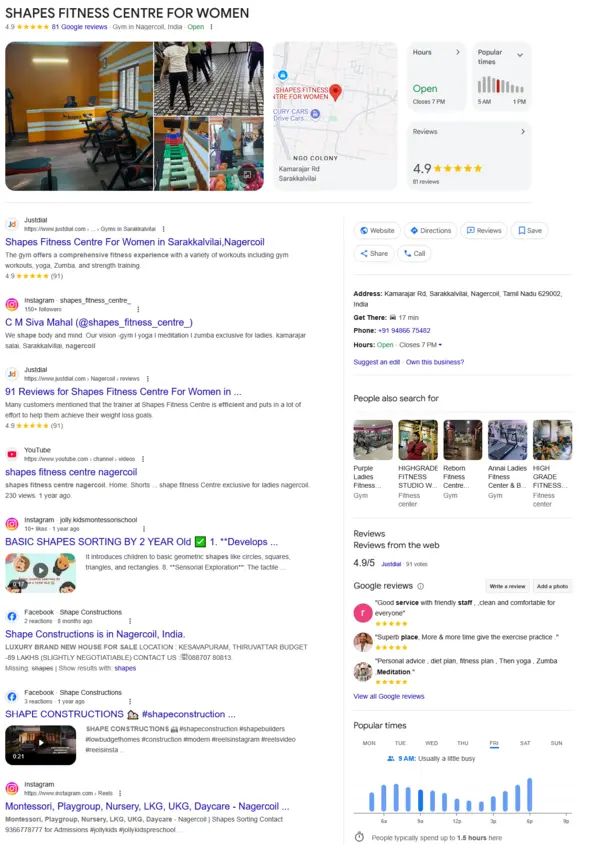
Imagine someone is walking through your neighborhood looking for a nearby florist. They open Google Maps. Search for “flower shops near me.” Several businesses appear on the screen. One of them is a sponsored listing with a location, business details, and directions.
The customer notices it, checks the distance, and decides to visit.
Now think about your business. How many potential customers are searching for the products or services you offer in your area? Choosing your competitors instead?
This is where Google Maps Ads can help. Instead of waiting for your business to gain organic visibility, you can use Google Ads to reach people searching for nearby businesses and encourage them to visit your physical store.
Simply running an advertisement is not enough. Your location, keywords, targeting, budget, and campaign management all influence how effectively you attract customers.
Make Your Google Business Profile Ready Before Spending on Ads
Here is something worth checking before launching a Google Maps Ads campaign.
Imagine your advertisement attracts a customer. The customer sees an incorrect address, an outdated phone number or missing business hours. Would they still feel confident visiting your store?
Probably not.
Your Google Business Profile is a part of the customer’s decision-making process. Before launching your campaign, check the following,
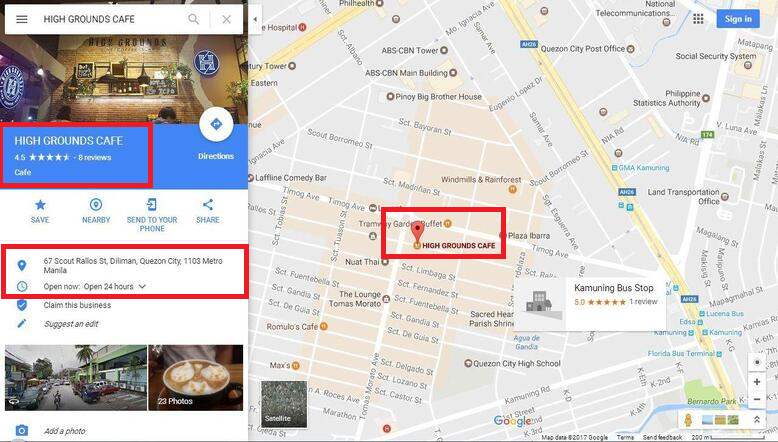
- Business address – Make sure your store location is accurate.
- Opening hours – Update regular and holiday operating hours.
- Phone number – Add the correct contact number.
- Business categories – Choose categories that accurately describe your services.
- Photos – Upload recent pictures of your storefront, products, and interiors.
- Reviews – Monitor customer feedback and respond professionally.
- Business information – Keep your services and other details updated.
Also connect the Google Business Profile location source to your Google Ads account through location assets.
Set Up Your Google Maps Ads Around Your Actual Store Location
If you own a store, your advertising should focus on customers who can realistically reach your location.
For example, imagine you run a salon in Quezon City, Philippines. You don’t need to show your advertisements to someone living in another state when your main goal’s to attract walk-in customers.
Here is how you can set this up in Google Ads.
Connect Your Google Business Profile
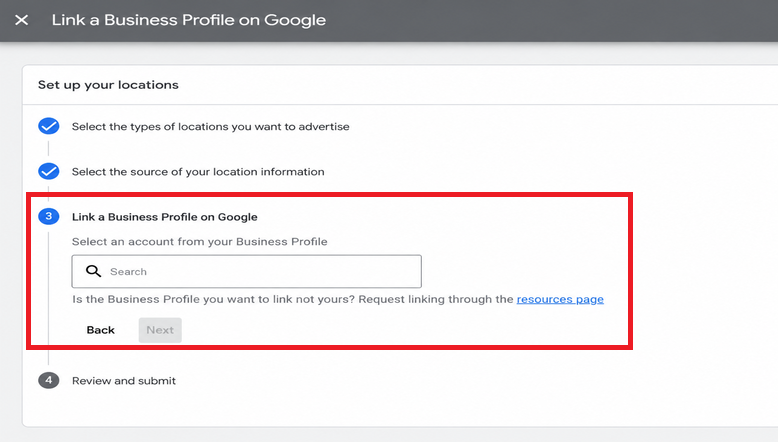
Open your Google Ads account. Go to Assets. Add a location asset. Link your Google Business Profile account. Select the business location so your advertisements can display your store address, map information, and directions when eligible.
Target an Area Around Your Store
Go to Campaigns. Select your campaign. Open Locations, and click the edit option. Choose Radius. Enter your store address as the centre point and select a suitable distance around it.
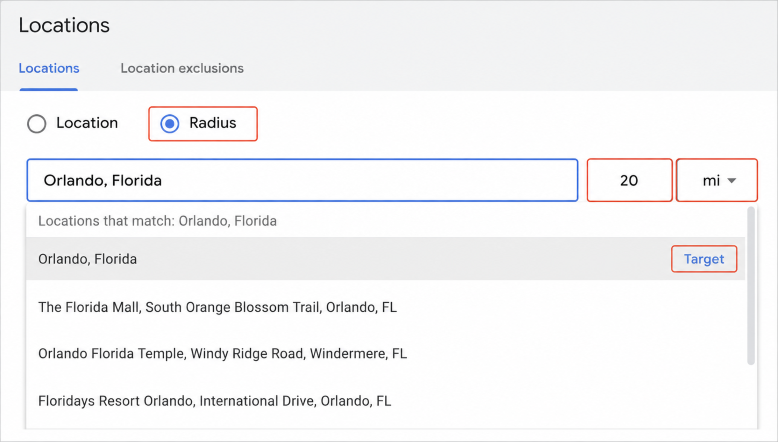
For example, a salon may begin by testing a five km radius around its store. A larger store or a business that serves an area may need a different radius. Make sure to tweak the radius according to where your actual customers are located.
Choose the Right Location Setting
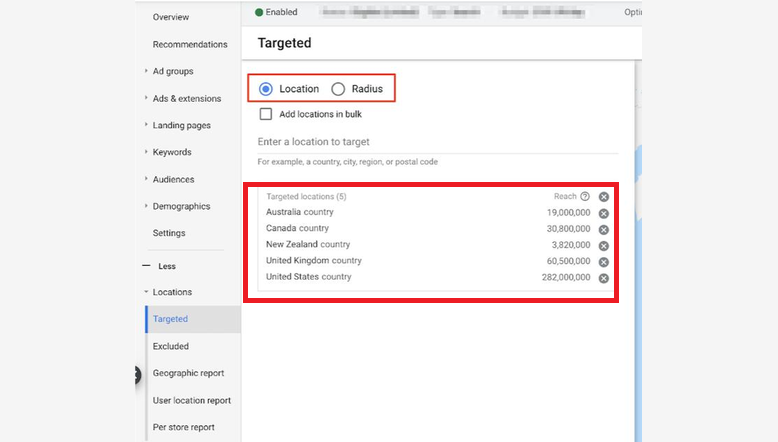
Open Location options in your campaign settings. If you only want to reach people who are physically present or regularly present in your selected area, choose Presence, People in or regularly in your included locations. This is different from the default Presence or Interest setting, which can also reach people outside your selected area who have shown interest in it.
Exclude Areas You Don’t Serve
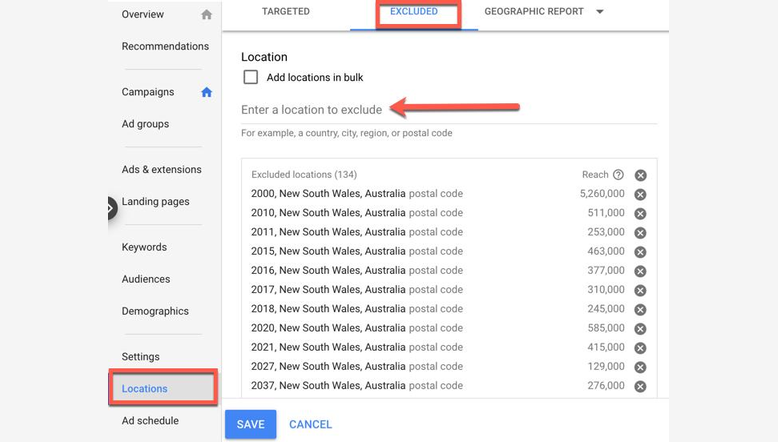
If your store only serves neighborhoods, exclude locations outside your service area where necessary. This helps avoid spending your budget on customers who’re unlikely to visit your store.
Check Where Your Customers Come From
After your campaign starts running, review the location report in Google Ads. Check which areas generate clicks, calls, and conversions. Compare these results with customer visits and enquiries before changing your targeting.
Your Keywords Should Match What Customers Want to Do
Choosing keywords only because they have high search volume can waste your advertising budget. A person searching for “what’s a dental implant” may be researching a treatment. Someone searching for ” implant clinic near me” may be closer to contacting a local clinic.
Both searches have value. They represent different intentions.
When creating a Google Maps Ads strategy, consider keywords based on
- Service searches – “emergency plumbing service near me.”
- Product searches –”florist near me.”
- Location searches – “Italian restaurant in downtown.”
- Action-based searches – “book a salon appointment near me.”
- Brand searches – Your business name and relevant branded terms.
Check the keywords on a regular basis to get a sense of what people are actually looking for, even before they view your ads. If irrelevant searches are consuming your budget, refine your keyword strategy. Use negative keywords where appropriate.
How Do Google Maps Ads Actually Appear?
Google Maps advertising does not always look like a search advertisement. Depending on the campaign type, eligibility, search context, and auction, customers may encounter advertising formats.
Promoted pins
These are sponsored pins that stand out from the regular map pins. A radius can help customers notice your business while exploring an area.
Map search ads
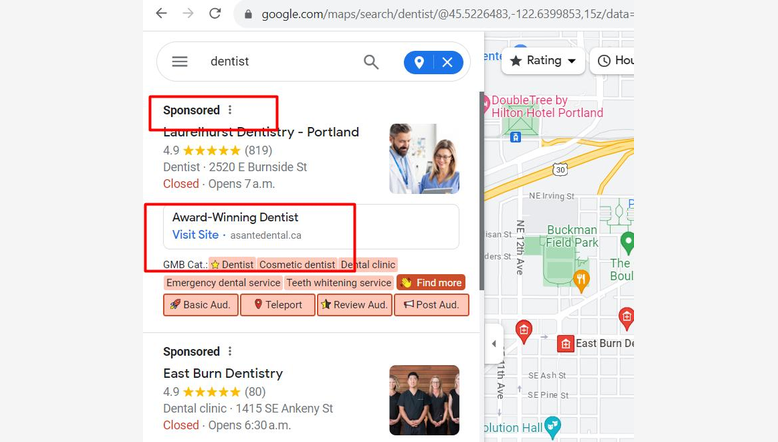
These advertisements can appear in Google Maps search results when someone searches for a business, product, or service.
Maps suggest ads
These can appear as sponsored suggestions while customers use Google Maps. The format shown depends on Google’s ad-serving decisions. You cannot guarantee that your business will appear in a position or format every time.
Why Should You Continue Managing Your Google Maps Ads?
Getting your campaign live is the beginning.
Imagine that your restaurant receives calls during weekends but very few enquiries on weekdays. If you continue spending the same way without reviewing campaign performance, you might miss opportunities to allocate your budget more effectively.
That’s why proper Google Maps Ads management is important. Check on the performance of your campaign once a week. Try to spot trends in search terms, location performance, cost per click, conversions, and customer enquiries.
These are some areas to watch,
1. Check out your search terms Identify searches. Tighten up the keywords and save on wasted money.
2. Check performance Compare the results from locations. If some areas generate enquiries, consider adjusting your targeting and budget.
3. Keep track of your advertising expenses Monitor CPC and CPA. The more they spend on ads, the more successful they will be is not the rule.
4. Adjust campaigns for demand There may be more flowers sold during Mother’s Day and Valentine’s Day. Trends in customer counts for holidays and weekends may be observed at restaurants. Adjust your advertising strategy according to demand.
5. Improve underperforming ads Review advertisements that are attracting clicks without customer actions. Test messages, keywords, and campaign settings.
6. Measure the value of your leads A campaign generating twenty enquiries may be more valuable than one generating one hundred clicks. Focus on quality, not traffic volume alone.
How to Set Up Google Maps Ads
- Link your Google Business Profile to your Google Ads account using location assets.
- Open Google Ads. Create a new search campaign.
- Select your campaign goal, such as leads or store visits.
- Go to Locations in campaign settings.
- Choose Radius. Enter your store address.
- Set a distance such as 5 km around your store.
- Add location-related keywords, such as salon near me or grocery store near me.
- Create your ads with your store name, services, and a clear call to action.
- Set your budget and launch the campaign.
Don’t Let Nearby Customers Choose Your Competitors
Your potential customers are already using Google Search and Google Maps to decide where to shop, eat, book appointments, and find services.
The question is whether your business is visible when they make that decision. Google Maps Ads can help put your business in front of local searches, but the results depend on proper campaign setup, accurate location information, suitable keywords, and ongoing optimization.
At GBP SEO, we help businesses with Google Maps Ads setup and ongoing campaign management. If you haven’t started advertising on Google Maps, our team can help you plan and set up your campaign. Contact the GBP SEO team to discuss your Google Maps advertising strategy and bring local customers closer to your store.